Chrome extensionVersion 2.1.1

Pick, edit, save, and extract colors without leaving the page.

Color Picker is a lightweight Chrome extension with automatic HEX copying, precise color controls, reusable palettes, history, webpage color extraction, image discovery, gradient tools, and downloadable palette images.

  • Free to install
  • No account
  • No analytics
  • Local-first storage
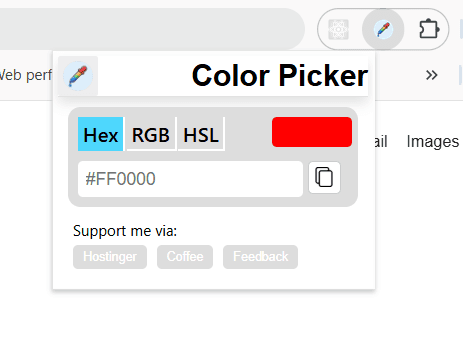
Pick from the page#FF0000

Copied automatically

Color Picker Chrome extension panel open over a webpage

From a single pixel to a reusable color system.

Pick a color from the current screen, adjust it, save it, return to it later, or move it into a complete palette or gradient. The floating panel stays close to the work without taking over the webpage.

PickEditSaveExport

The color tools you need, inside the browser.

01

Pick colors without leaving the page

Use Chrome's native eyedropper to select a visible color. The HEX value is copied automatically and added to your palette.

  • Open it from the toolbar or with Alt + Shift + C
  • Move or minimize the floating panel
  • Panel position and minimized state are remembered
02

Edit colors precisely

Fine-tune saturation, brightness, hue, and alpha with visual controls or editable numeric values.

  • Work in HEX, RGB, or HSL
  • Create transparent colors with alpha controls
  • Copy the current color in your preferred format
03

Build reusable palettes

Save up to 24 colors, undo or redo changes, and export the complete palette as CSS custom properties.

  • Add, select, or remove individual colors
  • Clear, undo, or redo palette changes
  • Download an edge-to-edge PNG palette locally
04

Keep history and favorites

Return to recent colors without repeating a pick, and pin colors that matter to current projects.

  • Stores up to 100 recent colors
  • Save up to 50 favorites
  • Reuse or remove saved colors with one click
05

Extract colors and images

Scan visible CSS colors only when requested, or discover eligible images and send one to RazSoft's image color extractor.

  • Extract visible CSS colors locally
  • Find images, CSS backgrounds, and SVG images
  • Add one extracted color or the complete result
06

Continue in connected color tools

Turn the selected color into a full shade system or create a multi-color gradient from the current palette.

  • Open the palette generator with the current color
  • Send multiple colors to the gradient generator
  • Preserve palette order between tools

Fast when you need one color. Capable when you need more.

Color Picker remembers recent colors, favorites, preferences, and panel position between sessions. Features load only when requested, keeping the everyday picking experience responsive and visually quiet.

  • Light, dark, and system themes
  • HEX, RGB, or HSL as the default format
  • Keyboard shortcuts for picking and palette history
  • Arrow-key control for saturation and brightness
  • Native JavaScript, CSS, and Chrome APIs
  • No runtime dependencies

Your colors and browsing activity stay yours.

Palettes, history, favorites, settings, and panel position are stored locally in Chrome. The extension does not automatically upload page content, screenshots, colors, or browsing history. It includes no analytics and accesses the current page only after you activate it.

Local processing

CSS extraction and palette-image generation run locally in your browser.

Optional connected tools

Palette, gradient, and image tools open only after you request them and receive only the selected HEX values or image URL needed for that action.

No permanent page access

The extension uses temporary access to the active tab instead of permanent website access.

Why each Chrome permission is needed.

PermissionPurpose
activeTab

Temporarily access the current page after you activate the extension.

scripting

Add the floating picker or a requested color and image scanner to the page.

storage

Save palettes, history, favorites, settings, and panel position locally.

clipboardWrite

Copy picked colors and user-requested CSS exports.

Good to know

  • Chrome system pages, the Chrome Web Store, and restricted pages block extension injection.
  • Image extraction works best with publicly accessible HTTP or HTTPS image URLs.
  • Browser-local blob and data images cannot be opened by the external image extractor.
  • Content inside cross-origin frames may be unavailable because of browser security rules.
  • External palette and gradient tools receive six-digit RGB HEX values without alpha.

Start picking colors directly from the page.

Install Color Picker free from the Chrome Web Store. No account is required.

Install Free from the Chrome Web Store